
Home » Data Capture » Facial Recognition Terminals
Facial Recognition Biometric Terminals
Chronicle are proud and excited to be introducing our newest innovation in ‘time clock’ and workforce management devices, the GT8.
We can announce the GT8, our most ambitious project to date is here. This product represents a step forward in what Chronicle Online and these devices are capable of.
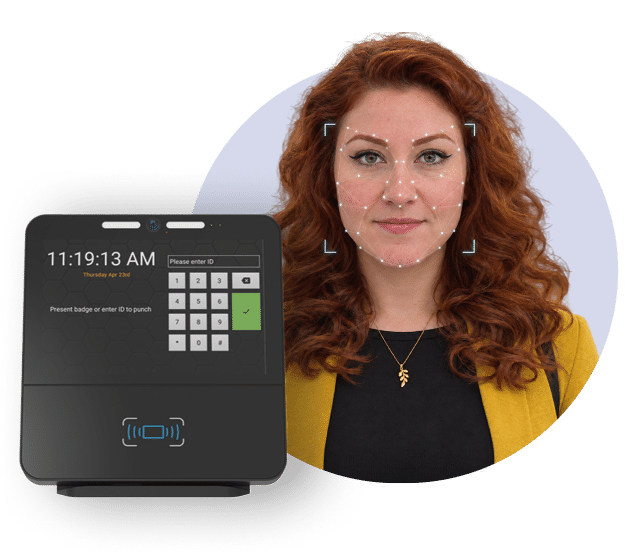

Touchless Clocking
Facial recognition helps prevent
buddy punching

Simple Setup
Get up and running
quickly

Reliable Records
Accurate secure and
always on
Non Invasive, Simple to set up,
Affordable and Reliable

Enhanced security including encrypted PII/biometric data
As global privacy rules tighten, the GT8 protects personal and biometric data used to prevent payroll fraud. An encrypted file system, secure boot, hardware-backed key storage and a hardened operating system keep information secure.

GT8 uses Android™10 providing maximum
flexibility
The GT8 runs Android™ 10, allowing applications to be developed using familiar tools and frameworks. Over-the-air (OTA) updates keep the operating system current and secure, providing flexibility for your application needs.

Quad-Core Processor
The GT8 combines a 1.6 GHz quad-core processor, 3 GB of RAM and 16 GB of high-performance flash storage. Together, these specifications provide the processing power and capacity needed to support today’s native and web applications.

Facial Recognition
Facial recognition provides touchless biometric identification to help prevent payroll fraud caused by ‘buddy punching’. It can be included through our standard application or a custom application developed by our professional services team.

5 Megapixel IR Camera
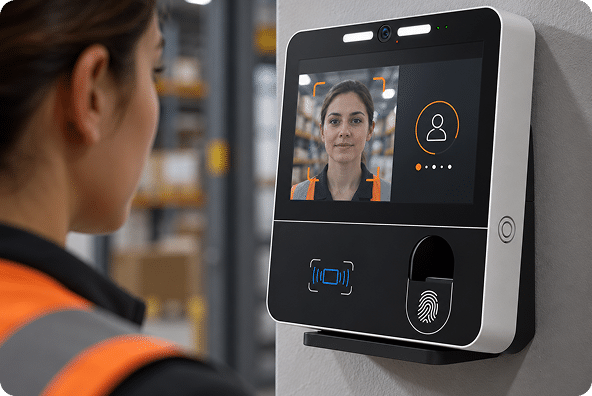
The GT8’s 5-megapixel infrared (IR)/visible-light camera and illumination LEDs support facial recognition. Its enhanced exposure mode further improves performance across varied lighting conditions, helping the camera capture faces effectively as workplace lighting changes.

Proximity/Biometric Illumination
An illuminated prompt shows users where to present credentials or place their finger for biometric identification, making the terminal intuitive to use. Customise the light’s colour, brightness and effect to match your branding and preferences.

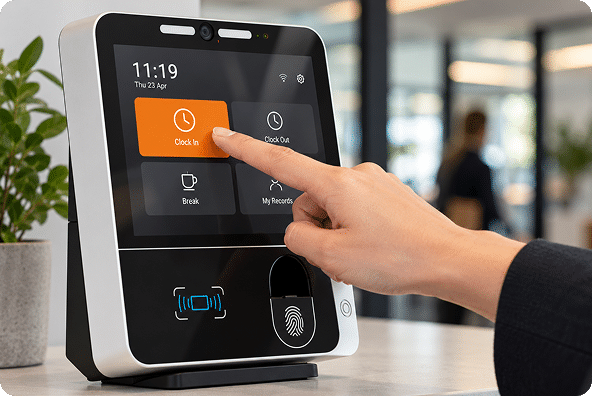
High resolution (1280×800) 8” full-colour touch
display
The GT8’s 8-inch, 1280 × 800 full-colour display delivers responsive, precise interaction familiar to mobile users. Its hardened, capacitive multi-touch screen combines an intuitive experience with a tough, durable surface for everyday use.
Frequently Asked Questions
The GT8 is a modern time and attendance terminal that allows employees to clock in and out using facial recognition technology. It provides a quick, contactless way for employees to record their attendance and integrates directly with Chronicle Online.
An employee enrols their face against their employee record. When they subsequently clock in or out, the GT8 compares the person standing in front of the terminal with their enrolled facial biometric information.
Once successfully identified, the employee’s clocking is recorded and transferred to Chronicle Online.
No. Facial recognition provides a contactless clocking method. Employees simply stand in front of the terminal and allow the device to identify them.
Recognition is designed to take place within seconds, allowing employees to clock in or out quickly without entering a PIN or presenting a card.
Facial recognition significantly reduces the opportunity for “buddy clocking”, where one employee clocks in or out on behalf of another.
As the employee must be physically present and successfully recognised, facial biometrics provide a stronger method of verifying identity than a shared PIN or attendance card.
Facial recognition systems use biometric information created from the employee’s facial characteristics to perform identification.
The precise method of enrolment, storage and processing depends on the GT8 configuration and the customer’s Chronicle implementation. Customers should ensure that their biometric processing arrangements are reflected within their internal privacy and data-protection documentation.
Not necessarily. Facial recognition technology can create a biometric representation or template from facial characteristics which is then used to compare the individual during future clockings.
A biometric template should not be confused with simply storing a photograph in an employee profile.
Yes. Where facial information is processed for the purpose of uniquely identifying an individual, it is biometric data and requires appropriate protection under applicable data-protection legislation.
Organisations using facial recognition should ensure they have an appropriate lawful basis and supporting policies for its use.
The appropriate legal basis for processing biometric data depends on the organisation, jurisdiction and circumstances in which the technology is being used.
Employers should carry out their own data-protection assessment and, where appropriate, obtain legal or data-protection advice before introducing biometric identification.
Chronicle can provide information about how the system operates to assist customers with their assessment.
Organisations introducing biometric technology should consider whether a Data Protection Impact Assessment (DPIA) is required.
Because facial recognition involves biometric information used to identify individuals, completing a DPIA is generally a sensible part of an organisation’s implementation and governance process.
Organisations should establish their own policy for biometric clocking and consider whether an alternative clocking method is appropriate.
Chronicle can support alternative methods of recording attendance depending on the customer’s configuration, including options such as proximity cards, PINs, desktop clocking or mobile clocking.
In normal circumstances, facial recognition systems are designed to accommodate everyday variations in appearance such as glasses. Recognition performance can, however, be affected if a significant part of the face is obscured.
Normal changes in appearance should generally not require an employee to be enrolled again. Significant changes to facial appearance may occasionally require the biometric record to be updated.
If identification is unsuccessful, the employee can try again and ensure they are facing the terminal clearly.
If recognition continues to fail, an administrator can review the employee’s enrolment and, if necessary, enrol the employee again or provide an alternative clocking method.
If identification is unsuccessful, the employee can try again and ensure they are facing the terminal clearly.
If recognition continues to fail, an administrator can review the employee’s enrolment and, if necessary, enrol the employee again or provide an alternative clocking method.
Good, consistent lighting provides the best recognition performance. The terminal should therefore be positioned in an appropriate location and installed in accordance with the recommended installation guidance.
Employees should present themselves individually to the terminal when making a clocking. This ensures that the correct individual is identified and the correct attendance transaction is recorded.
Recognition performance depends on the terminal hardware, surrounding lighting and installation environment. The terminal should be installed in a location that provides suitable conditions for reliable facial identification.
Once an employee is successfully identified, the GT8 creates a time and attendance clocking.
That transaction is transferred into Chronicle Online, where it can be used within the employee’s attendance record, timesheet, shift rules, exceptions, absence management and payroll processes.
The GT8 requires network connectivity to communicate with Chronicle. Depending on the terminal configuration, clockings may also be retained locally during temporary communication interruptions and transmitted when connectivity is restored.
Yes. Organisations can deploy terminals across different entrances, departments or locations while managing employee attendance centrally through Chronicle Online.
Yes. Where employees are authorised to use multiple terminals or locations, their clockings can still be recorded against the same Chronicle employee record.
Yes. A customer might use GT8 facial recognition terminals at a main site while allowing other employees to clock using a mobile app, desktop clocking or another compatible Chronicle terminal.
All authorised clockings can be consolidated within Chronicle Online.
Facial biometric clocking can provide:
- Fast employee identification
- Contactless clocking
- Reduced reliance on cards or fobs
- No forgotten or lost clocking cards
- Reduced opportunity for buddy clocking
- Improved confidence that the employee making the clocking is physically present
- Direct integration with Chronicle Online
- A simple clocking experience for employees
Yes. Chronicle can assist with terminal configuration, employee setup, implementation and training to help organisations introduce GT8 terminals as part of their Chronicle time and attendance system.

