Work Faster with Improved Productivity
Chronicle V2 introduces several time-saving enhancements to streamline everyday tasks. As an overview, let’s explore what’s new in Chronicle V2 to help improve your workflow:
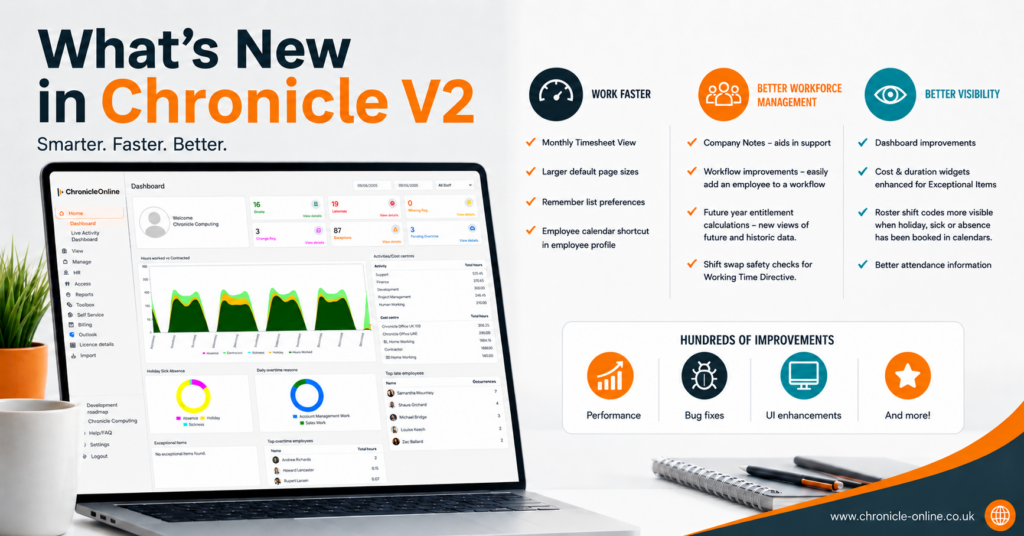
- Monthly Timesheet View
- Larger default page sizes
- Remembered list preferences
- Employee calendar shortcut
Smarter Workforce Management
Managing your workforce is now easier with new tools and workflow improvements. Additionally, you’ll find more updates in Chronicle V2—what’s new for smarter management will enhance your experience.
- Company Notes
- Workflow improvements – easily add an employee when creating them to a work flow
- Future year entitlement calculations – new views of future and historic data.
- Shift swap safety checks from Working Time Directive
Better Visibility Across Your Business
Gain clearer insights with enhanced reporting and dashboard features. By the way, among the new features in Chronicle V2, better visibility stands out as an important improvement.
- Dashboard improvements
- Cost & duration widgets enhanced for Exceptional Items
- Roster shift codes more visible when holiday sick or absence has been booked in calendars.
- Better attendance information
Performance Improvements
Chronicle V2 also includes hundreds of behind-the-scenes enhancements to deliver a faster, more reliable experience. To summarize, if you are curious about what’s new in Chronicle V2, these improvements certainly boost performance and reliability.
- Hundreds of feature improvements.
- Performance optimisations for a smoother user experience.
- Bug fixes to improve stability and reliability.
- User interface (UI) enhancements for a cleaner, more intuitive experience.