Quick Answer
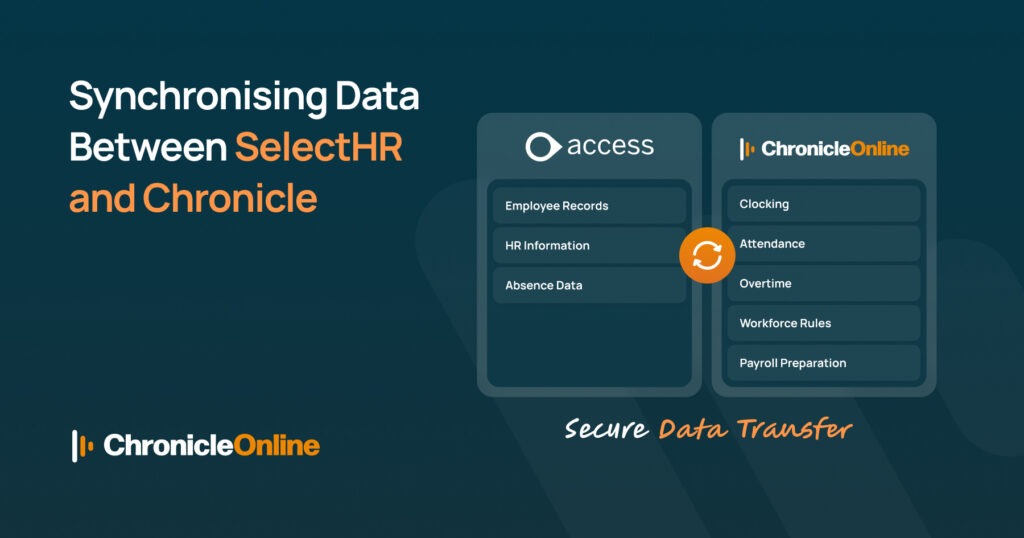
SelectHR and Chronicle can be linked through a secure, configurable file transfer, so holiday requests, sickness records and absence entries update automatically in both systems instead of being entered twice. This removes the manual reconciliation that causes conflicting holiday balances, payroll errors and shift double-booking, and it gives you the kind of clean, auditable records now required under the UK’s new holiday pay record-keeping duty, which takes effect from 6 April 2026. Setup typically takes two to four weeks, including a parallel testing period, and neither system needs to be replaced.
If you’ve ever had a member of staff insist they’ve booked a week off in SelectHR, only for Chronicle to show them as available for a shift, you’ll already know the problem. Two systems, two versions of the truth, and an HR team stuck in the middle trying to work out which one is right. It’s a familiar headache for growing UK businesses that adopted SelectHR for personnel records long before they needed proper time and attendance tracking, or vice versa.
The good news is that this doesn’t have to be a permanent state of affairs. With the right setup, holiday requests, sickness records and absence entries can flow between SelectHR and Chronicle automatically, keeping both systems accurate and cutting out a fair chunk of manual admin. This article walks through how that works in practice, what to watch out for, and why getting this right matters more than ever given the UK’s tightened rules on holiday pay record-keeping, which take effect from 6 April 2026.
What Does “Syncing” Holiday and Absence Data Actually Involve?
At its simplest, syncing means that when something changes in one system, the other system finds out about it without a person having to type it in twice. For holiday and absence specifically, that usually covers a handful of core data points:
- Annual leave entitlement and how much has been accrued so far
- Booked, pending and cancelled holiday requests
- Sickness and other absence records, including start and end dates
- Return-to-work and fit note information where it’s tracked
- Basic employee details such as start date, department and manager
SelectHR is typically the system of record for the employee’s contract, personal details and entitlement rules. Chronicle, meanwhile, is where day-to-day attendance, shift patterns and self-service holiday booking usually happen. Without a link between the two, someone in HR ends up acting as the go-between, copying figures across by hand, which is exactly where mistakes creep in.
Not sure whether your setup needs a manual sync fix or a fully connected platform? See how Chronicle’s Time & Attendance works alongside your existing HR system →
Where the Data Usually Gets Stuck
In our experience, the sticking point is rarely a lack of willingness. It’s that the two systems were bought at different times, for different reasons, and nobody planned for them to talk to each other. Holiday balances drift apart within a few months, absence reasons get logged differently in each place, and by year-end, reconciling the two can take days rather than minutes.
Why Running Two Disconnected Systems Causes Real Problems
It’s tempting to treat this as a minor inconvenience, but the knock-on effects add up quickly for HR, payroll and line managers alike.
- Employees see conflicting holiday balances depending on which system they check
- Payroll runs the risk of under- or overpaying staff on sick leave or unpaid absence
- Managers approve shifts for people who are actually on annual leave
- Audit trails become inconsistent, which is a growing compliance risk
- HR spends hours each month reconciling spreadsheets instead of doing HR
Here’s a simple side-by-side of what changes once the two systems are properly linked:
| Task | Without Synchronisation | With Synchronisation |
| Updating a holiday booking | Entered manually in both systems | Entered once, updates both automatically |
| Checking leave balances | Two figures, often different | One accurate figure, always current |
| Payroll preparation | Manual cross-checking each cycle | Absence data feeds through automatically |
| Compliance record-keeping | Scattered across spreadsheets and systems | Centralised, auditable, and consistent |
| HR admin time | Several hours a week on data entry | Minutes spent reviewing exceptions |
How Chronicle Connects With Access SelectHR
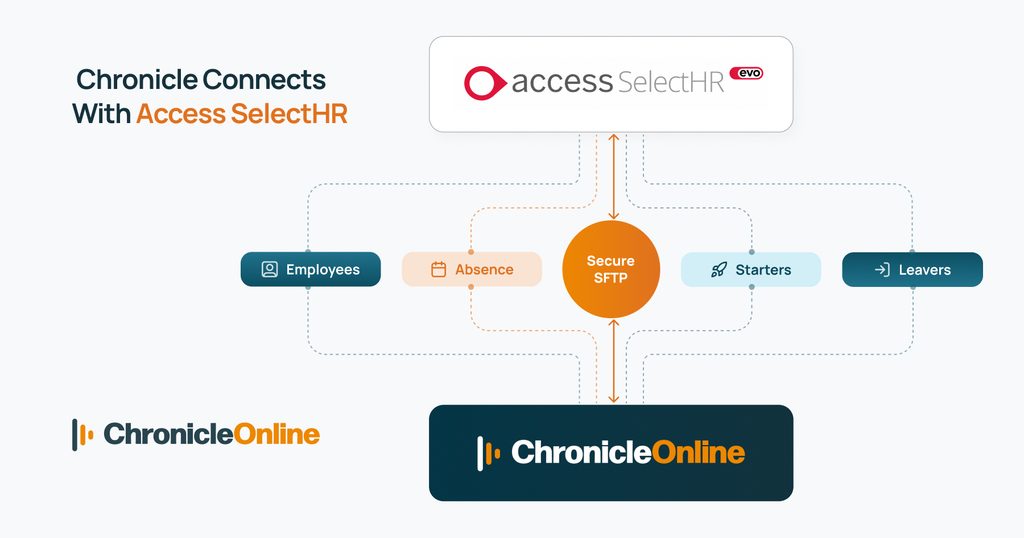
Chronicle’s approach to this is deliberately low-fuss. Rather than asking you to replace SelectHR, it sits alongside it and exchanges data through a configurable, secure file transfer. You can read the technical details on the Access SelectHR integration page, but the short version is that SelectHR exports employee and absence data on a schedule, Chronicle picks it up automatically, and the mapped fields update within Chronicle without anyone lifting a finger.
The typical flow looks like this: Access SelectHR exports the relevant records, the file is transferred securely, and Chronicle applies the field mappings that were agreed during setup. From that point on, updates happen on a schedule rather than depending on someone remembering to run a manual import.
What Data Typically Flows Across
- Personal and employment details: name, department, start date, manager
- Holiday entitlement and accrual rules, including pro-rata calculations
- Absence and sickness records, including statutory sick pay flags
- Contract type, which drives how holiday and overtime rules are applied
If you’d like to see how Chronicle handles the underlying calculations, our guide to holiday balance calculations covers how entitlement is worked out for salaried, shift-based, and zero-hours staff.
Setting Up the Sync: A Step-by-Step Overview
- Audit your current data. Check that employee records in SelectHR and Chronicle actually match before you connect anything.
- Agree on the field mappings. Decide how each SelectHR field should translate into a Chronicle field, particularly for absence reason codes.
- Set the export schedule in SelectHR. Most organisations run this daily, though some prefer more frequent exports for larger, multi-site teams.
- Configure the secure file transfer. Chronicle’s implementation team will help set up the credentials and folder structure.
- Run a parallel test period. Keep both systems live side by side for a fortnight or so to confirm the figures match before switching over fully.
- Train your HR and payroll teams. Make sure everyone knows which system is now the source of truth for day-to-day booking.
Knock-On Benefits for Payroll
Holiday and absence data doesn’t stay in HR’s corner for long it feeds straight into payroll every single cycle. When the figures are wrong, payroll teams either chase down discrepancies manually or, worse, pay someone incorrectly. Once SelectHR and Chronicle are synchronised, absence data flows through cleanly to the payroll side of the platform, so statutory sick pay, unpaid leave and holiday pay calculations are based on figures that are actually current.
This matters just as much for businesses using an online payroll software UK provider outside of Chronicle. Whatever payroll system you run Xero, Shape Payroll, Staffology, or another provider accurate, synchronised absence data reduces the number of manual adjustments needed before each pay run, and that reduces the chance of a costly correction after payslips have already gone out.
Staying on Top of UK Holiday Pay Compliance
Record-keeping around annual leave has become a bigger compliance issue in the UK, not a smaller one. From 6 April 2026, employers are under a new legal duty to keep clear, auditable records covering entitlement, leave taken, and how holiday pay was calculated, retained for a minimum of six years. Failure to do so is now treated as a compliance breach with real enforcement consequences, not just an administrative shortfall.
Trying to meet that standard with two systems that don’t agree with each other is asking for trouble. A synchronised setup gives you one consistent, timestamped record of who took what leave and when, which is a far easier position to defend if a query or an inspection ever comes up. For a full breakdown of what the new duty requires, see our guide on UK holiday pay record-keeping and how Chronicle helps you stay compliant.
Why This Fits Into a Bigger HR Software Solution Strategy
Fixing the SelectHR-to-Chronicle link is worthwhile on its own, but it’s really one piece of a wider decision that most growing UK businesses eventually face: whether to keep patching together separate tools, or to move towards a single, connected HR software solution that handles HR records, attendance, absence and self-service in one place. Integration solves today’s data mismatch. A joined-up platform removes the need for integration altogether, because there’s only ever one version of the truth to begin with.
Chronicle’s own HR module, for instance, works hand-in-hand with its employee self-service tools, letting staff book holidays, check balances and update their own details from a phone or laptop, all recorded against the same time and attendance data used for scheduling and payroll. There’s nothing to reconcile because there’s nothing to duplicate.
Whichever route you take, the underlying principle is the same: the fewer places your holiday and absence data lives, the fewer chances there are for it to go wrong.
Conclusion
Holiday and absence data has a habit of drifting out of sync quietly, until the day it causes a real problem an incorrect payslip, a double-booked shift, or a compliance question nobody can answer cleanly. Connecting SelectHR and Chronicle closes that gap, giving HR, payroll, and managers one accurate picture instead of two competing ones.
Whether you stick with an integrated setup for years or eventually move towards a single connected platform, the goal is the same: less time spent reconciling spreadsheets, and more confidence that the numbers behind every holiday, absence and payslip are right the first time. Read more in our FAQ, or get in touch to discuss your setup.
Frequently Asked Questions
Does synchronising SelectHR and Chronicle require replacing either system?
No. The integration is designed to sit alongside both platforms, so SelectHR continues managing core HR records while Chronicle handles time, attendance and holiday booking. Neither system needs to be replaced for the sync to work.
How often does data update between the two systems?
This is configurable during setup. Most businesses run a daily export, though organisations with larger or multi-site workforces sometimes opt for more frequent updates to keep absence records as current as possible.
Is this kind of integration secure?
Yes. Data is transferred using a secure file exchange rather than open email or shared drives, and access is controlled through credentials agreed during implementation. It’s worth checking your provider’s certifications, such as Cyber Essentials, when setting this up.
What is the best HR software solution for small and medium UK businesses?
The right choice depends on how many separate systems you’re currently juggling. For SMEs already using Access SelectHR, integrating it with a platform like Chronicle often delivers most of the benefit of full consolidation without the disruption of switching HR systems entirely. Businesses starting from scratch may prefer a single connected HR software solution from day one.
Can this integration help with online payroll software UK compliance requirements?
Indirectly, yes. By keeping holiday and absence records accurate and consistent, synchronisation reduces the manual corrections payroll teams need to make each cycle, whichever online payroll software UK provider you use, and supports cleaner record-keeping for the statutory holiday pay obligations that take effect from 6 April 2026.
How long does it typically take to set up?
Implementation time varies with complexity, but standard setups are generally completed within two to four weeks, including a parallel testing period before the two systems fully rely on each other.